
Unlike any journey one usually takes in bringing a manuscript to life, Lavinder Hill Publishing has uniquely streamlined the transition from handwritten words to digital brilliance. Our approach distinguishes us from competitors by making every stage of this transformation clear, supportive, and accessible. From the very first draft to the final screen-ready version, we meticulously guide our authors, ensuring perfection at every turn. Each phase of the process is not only described in detail but is also accompanied by illustrative examples, empowering our clients to understand and visualise each step. This commitment to transparency and excellence means that our authors can focus on their creativity, confident that Lavinder Hill Publishing will handle the technicalities with precision and care, making the entire journey smooth and rewarding.

Document Preparation
Lavender Hill Publishing has established specific requirements for document submission. The following section provides a clear and accessible approach to preparing your work for any eventuality. These guidelines include details on margins, paper sizes, and layout, and have been extracted directly from our own Microsoft Word pages.
Nevertheless, regardless of their source, the measurements shown are relevant and compatible with a variety of word processing programmes.
Upload Friendly Formatting
It's important for you to note that the data and recommendations set out below have been thoroughly tested to ensure a smooth upload process. There's nothing worse than reaching the exciting stage of having your work published, only to find errors in the layout, and the entire publication is rejected simply because it doesn't comply with the company's software philosophy. However, the rules are not set in stone, so you can retain the flexibility you have to adapt your work as you see fit. Nevertheless, we've supplied definitive guides should you find yourself stumbling along the way. This provides an opportunity for you to refer back to our original reference pages and reinstall them. They also work seamlessly with most major online publishers, helping avoid common formatting issues and delays.
This information will also appear in our Terms & Conditions and in our freestanding brochure.


Preparing Your Setup
Appearance
The positioning of your first and last three pages of any manuscript you submit must contain both the front and back cover as graphically defined. Then, following your upload checks, choose the files according to the illustrated guides.
Remember, the first page your prospective audience views is the front cover; that's pretty obvious. The back cover indicates where the book ends, so the software requires an even number of pages to properly format the final few pages.
Front Cover
Although it may appear straightforward, life often presents complexities. To avoid any discrepancies, it is important for us to document each part methodically.
A well-designed book cover should incorporate several crucial components to ensure it stands out and appeals to potential readers. These include the title, author name, and a captivating, genre-appropriate image that immediately draws attention. Additionally, a compelling subtitle (particularly for non-fiction titles) or a concise tagline can help hook readers. The overall design must function effectively as both a full-sized cover and a thumbnail image. Each of these aspects should be carefully evaluated during the design process.
- Essential Information: The full title and author name must be clearly displayed on the cover.
- Visuals: Use high-resolution illustrations, photographs, or graphic designs that accurately reflect the book’s genre and tone.
- Typography: Choose clear, legible fonts and establish a strong hierarchy, with the title being the most prominent feature.
- Colour Palette: Opt for simple, bold colours that create a memorable impact and avoid any clashing tones.
- Genre Markers: Include imagery that clearly communicates the book’s genre—whether romance, thriller, or science fiction—to the intended audience.
Back Cover
A book’s back cover should feature a compelling 100-200 word hook/blurb, 1-2 key testimonials, a brief author bio, a 13-digit ISBN with barcode, and a publisher logo. It must be designed to entice readers and reflect the genre's tone, often using a headline or tagline to grab immediate attention.
Key Elements For The Back Cover
- The Hook/Blurb: (200 words max): A concise, engaging summary that teases the conflict without spoilers, designed to sell the story.
- Tagline: A catchy, bolded sentence at the top to grab attention instantly.
- Testimonials/Reviews: Short, punchy quotes from reputable sources or, for fiction, fellow authors.
- Author Bio: A brief 2-4 line bio with a small photo, focusing on relevant expertise.
- Technical Info: 13-digit ISBN (with barcode) and the publisher logo/imprint.
Final Upload Checks
Lastly, note the maximum file size for uploading and what to do if your file is too large.
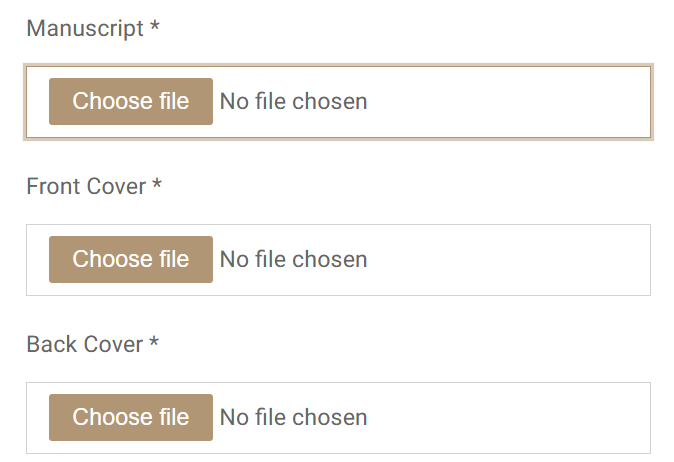

Common Mistakes to Avoid
- Don't use special characters in file names.
- Don't upload unsupported file formats.
- Don't use vague names (e.g., "Document1").
- Don't rely on auto-saving without confirming the file is attached to the specific application.
- Most importantly, and we can't recommend this highly enough. Make copy of your work and keep it somewhere safe.
Document Preparation and Formatting
- Preferred Formats: PDF is generally preferred because it preserves layout and is easily readable across most systems. Other acceptable formats often include DOC, DOCX, JPG, JPEG, PNG, and BMP.
- File Size Limits: Ensure files are not too large. Many systems have limits. If files are too large, compress them or reduce image quality.
- File Naming: Use clear, concise, and descriptive names (e.g., Stalkers - Upload Copy.pdf). Use hyphens to separate words and avoid special characters (such as < > ; : " ~ ' , % # @).
- Legibility: Scanned documents within your script must be clear and readable. High-resolution scans can result in large files, while low-resolution scans may be unreadable.
- Password Protection: Remove any passwords or encryption, as these can prevent systems from processing or viewing the document.
- Avoid Sensitive Data: Do not upload unnecessary personal data (e.g., Social Security numbers, banking information) unless explicitly required and on a secure, trusted platform. Lavender Hill Publishing will never undertake to collect that kind of information.
- Use Secure Connections: Only upload to websites that use HTTPS.
- Check Privacy Policies: Understand how the receiving organisation stores and uses your data.
- Verify Accuracy: Double-check that you are uploading the correct file, especially when dealing with multiple documents.
- Check for Completion: Wait for a confirmation message or visual indicator that the upload was successful.
- Name Fields: If required, provide a proper description or title in the document metadata.YouTube +4
"I can't say enough about the outstanding service I received from your company. Their team went above and beyond to meet our needs and exceeded our expectations."
Marina Reim